Digital Business Card for Small Businesses: Complete Guide
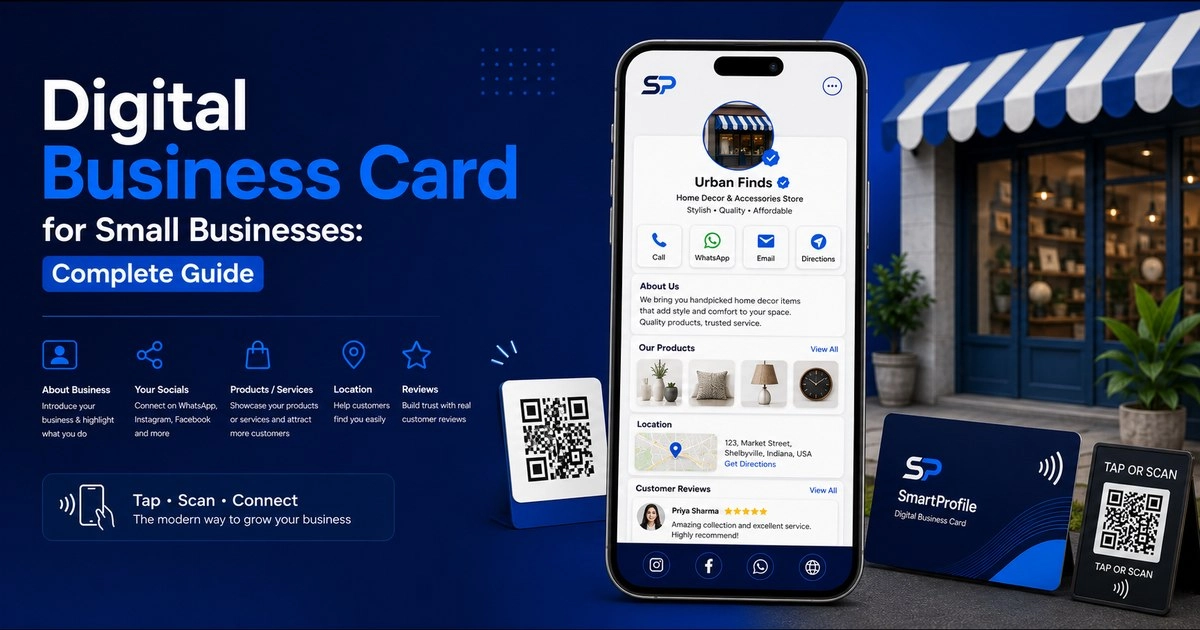
Running a small business in India today means competing with companies that have full marketing teams, polished websites, and a professional presence at every touchpoint. You don't need a big budget to compete on that front — a digital business card can be a simple and cost-effective way for a small business to create a professional online presence.
If you've ever handed someone a printed visiting card and later wondered whether they even kept it, this guide is for you. We'll cover what a digital business card is, why it matters for small businesses, what to include on it, how to actually use it day-to-day, and how it compares to NFC and QR sharing options.
What Is a Digital Business Card for Small Businesses?
A digital business card is an online version of your traditional visiting card — a single shareable link or page that holds your business name, contact details, services, social links, and anything else a customer might need to know before working with you. Instead of a piece of paper that can be lost, damaged, or thrown away, it's a live page that updates instantly whenever your details change.
Unlike a full website, which usually takes weeks to design and requires ongoing maintenance, a digital business card can be set up in minutes and works immediately on any smartphone. It's shared the same way you'd share a phone number — over WhatsApp, SMS, email, or by scanning a QR code — and the person receiving it doesn't need to install any app to view it.
Why Is It Useful for Businesses and Professionals?
Large companies already have brand recognition, dedicated marketing budgets, and established trust. A small business doesn't have that luxury — every single interaction has to build credibility from scratch. This is exactly where a digital business card earns its value.
It can help build trust. When a potential customer taps your card and sees your services, reviews, and contact details laid out clearly, it signals that you run things professionally — even if you're a one-person operation working from home.
It costs a fraction of a website. Small businesses often can't justify spending tens of thousands of rupees on a website in the early stages. A digital business card gives you most of the same benefit — a professional online presence — at a fraction of the cost and setup time.
It replaces printing costs entirely. Every time your phone number, address, or offerings change, a paper card becomes outdated and needs reprinting. A digital card updates instantly with zero reprinting cost, which matters a lot when margins are tight.
It works everywhere a paper card can't. You can attach your digital card link to Google review requests, WhatsApp broadcast lists, Instagram bio, and invoices — none of which is possible with a printed card.
What Information or Features Should You Include?
Not every field needs to be filled, but a strong small business profile typically includes the following (see our full guide on what to put on a digital business card for all 15 elements):
Business name and tagline. Keep this short and clear — this is often the first thing a customer reads.
Phone number and WhatsApp. Make sure both are tappable, so a customer can call or message with a single tap instead of having to copy-paste a number.
Business address with a map link. Especially important for local businesses like shops, salons, restaurants, or clinics where customers need to physically visit.
Products or services list. A short, clear list of what you offer removes friction — customers shouldn't have to ask "do you also do X?" if it's already listed.
Photos of your work or products. A gallery of real photos builds more trust than any amount of written description, especially for service-based businesses like tailors, contractors, or event decorators.
Customer testimonials or reviews. Even two or three genuine testimonials significantly increase a new customer's confidence before they reach out.
Social media links. If your business is active on Instagram or Facebook, linking it lets customers see your ongoing work and recent activity, not just a static page.
Save Contact button. This lets a customer save your business directly to their phone contacts in one tap, so they can find you again without searching.
How to Use It in Real Business Situations
A digital business card only pays off once it's actually part of your daily routine, not just something set up once and forgotten. A few situations where it makes a real difference:
At your shop counter or reception. A small QR code printed near the billing counter lets walk-in customers scan and save your details in seconds — useful for repeat orders or referring friends later.
During a home visit or service call. Electricians, tailors, interior decorators, and similar service providers can share their card over WhatsApp right after a job, while the customer is still deciding whether to recommend them to someone else.
At exhibitions and trade fairs. Instead of carrying stacks of paper cards that often get lost in someone's bag, a single tap or scan lets visitors instantly save your business — and unlike paper, it can't run out mid-event.
When asking for a review. After completing an order, sending your digital card link along with a request for a Google review makes it easy for the customer to also revisit your profile, see your other services, and refer you onward.
On invoices and quotations. Adding your card link or QR code to every invoice turns a one-time transaction document into an ongoing marketing touchpoint.
Digital Business Card, NFC or QR: Which Option Fits?
All three — a digital business card link, an NFC card, and a QR code — point to the same underlying profile, so the real question isn't which one to choose, but which one fits a given moment.
A shareable link works best for anything remote — WhatsApp messages, email signatures, social media bios, or SMS — where the customer isn't physically in front of you.
A QR code works best for printed or physical placements — shop counters, invoices, posters, packaging — where someone can scan it with their phone camera without you having to do anything.
An [NFC business card](/blog/what-is-nfc-business-card-how-it-works) works best for in-person meetings and networking events — it can open your profile with a single tap on compatible smartphones, no typing, no scanning angle to worry about, and it feels more premium than handing over a paper card. Explore NFC card options if you want a physical card.
Most small businesses end up using all three together: the link for online sharing, a QR code at the physical location, and an NFC card for face-to-face meetings — all pointing to the exact same, always up-to-date profile.
Common Mistakes Small Businesses Make
Leaving the profile incomplete. A half-filled profile with no photos or services listed can actually hurt more than help — it looks abandoned. Fill in every relevant field before sharing your card widely.
Not sharing it enough. Many business owners set up a digital card once and then forget to actually share it — add it to your WhatsApp Business "About" section, your Instagram bio, your invoices, and your Google Business listing.
Not asking for reviews. Testimonials don't appear on their own — after a successful order or service, ask satisfied customers for a short review to add to your profile. This one habit compounds over time and becomes one of your strongest trust signals. See our full guide on common digital business card mistakes to avoid.
A Quick Cost Comparison: Paper Cards vs Digital Business Card
Paper cards have recurring printing costs, and every change to your phone number, address, or business details may require another print run — an expense that adds up over time, especially for a growing business. A digital business card can be updated without reprinting, making it easier to keep your information current without repeat costs.
How to Get Started with SmartProfile
Setting up a digital business card as a small business typically takes less than ten minutes — see our step-by-step guide for the full walkthrough: enter your business details, add your services or products, upload a few photos, and your profile is live and shareable immediately. From there, you can share your unique link over WhatsApp, add it to a QR code for your shop counter, or order a physical NFC business card for in-person meetings.
If you want to see what a complete profile looks like before setting one up, you can check out a live demo first — or go ahead and create your SmartProfile now.