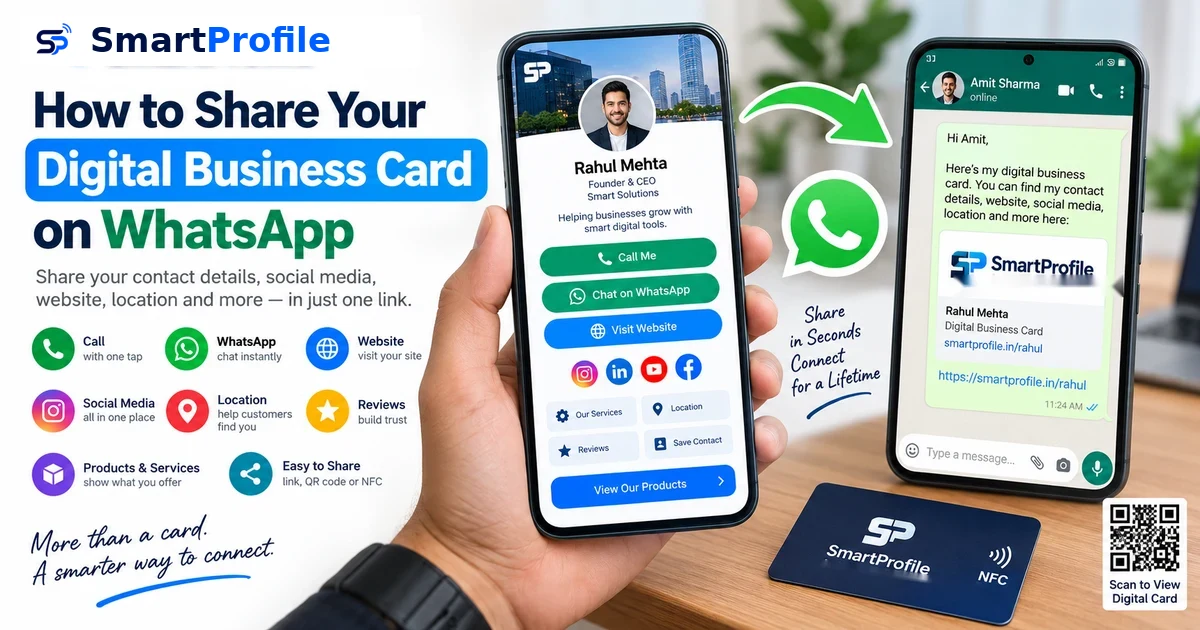
How to Share Your Digital Business Card on WhatsApp
Why Share Your Digital Business Card on WhatsApp?
WhatsApp is one of the easiest ways to share your digital business card with customers, clients, and professional contacts. Instead of sending your phone number, website, social media links, and business details separately, you can share one digital business card link in seconds.
That link opens your digital business card — a complete profile with your contact details, WhatsApp button, social media, location, products, and even customer reviews, all on a single page the person can save or forward to someone else. It works more like a mini business website you can send in one tap than a plain digital contact card.
How to Share a Digital Business Card on WhatsApp: Step by Step
Here's the fastest way to do it:
Step 1. Open your digital business card from your SmartProfile dashboard.
Step 2. Copy your profile link (smartprofile.in/yourname).
Step 3. Open WhatsApp and select the contact or group.
Step 4. Paste the link into the chat.
Step 5. Add a short message for context.
Step 6. Hit send.
That's the whole process — no printing, no typing out your details, no app installation required on the other end.
How to Create a Digital Business Card for WhatsApp
Before you can share a card, you need one. If you haven't set this up yet, the process takes a few minutes:
Step 1. Sign up on SmartProfile with your email or phone number.
Step 2. Add your name, business name, phone number, and address.
Step 3. Add your website, social media links, WhatsApp button, and any products or services you want to showcase.
Step 4. Save your profile — you'll get a permanent link like smartprofile.in/yourname.
We've covered this process in detail in our complete guide to creating a digital business card. Once your card is ready, sharing it on WhatsApp only takes a few taps.
5 Ways to Share Your Digital Business Card on WhatsApp
Share your card link directly. Copy your profile URL from your dashboard, open a WhatsApp chat, paste the link, add a short message, and send. This is the simplest method and works well for new customers or contacts you've just exchanged numbers with.
Send it right after meeting someone. At an event, exhibition, or store visit, instead of saying "I'll send you my number later," just send your card on the spot: "I'll share my digital business card with you on WhatsApp." They can save your details immediately instead of waiting for you to follow up.
Share your QR code. Most digital business cards come with a QR code you can save as an image and send through WhatsApp, or print on packaging, flyers, posters, and invoices. Anyone who scans it lands straight on your digital card — a simple way to connect your offline marketing with your online profile.
Use an NFC card in person. If you have an NFC-enabled business card, tapping it against a compatible phone can open your profile instantly — useful at networking events, trade shows, and sales meetings. You can still send the same link over WhatsApp for anyone you're not meeting face-to-face.
Add the link to routine WhatsApp replies. You don't need a separate message every time. When responding to a customer inquiry, just include the link naturally: "Thanks for reaching out — you can find our services, location, and contact details here: [link]."
Sample WhatsApp Message Templates
Sending just a bare link can feel a little abrupt. A short message alongside it makes the interaction feel more personal. Here are a few you can adapt:
For a new customer inquiry: "Hi! Thanks for reaching out. Here's my digital business card with all my contact details and services — smartprofile.in/yourname."
After a networking event: "Great meeting you today! Here's my card so you have everything in one place: smartprofile.in/yourname. Let's stay in touch."
For a sales follow-up: "Hi [Name], as discussed, here's my digital business card with our full catalog and contact info — smartprofile.in/yourname."
For a general introduction: "Hi, I'm [Your Name] from [Business Name]. You can view my full profile, services, and contact details here: smartprofile.in/yourname."
Keep the tone natural and match it to the conversation — a first-time introduction needs different wording than a quick follow-up with someone you've already spoken to.
Digital Business Card vs Traditional Business Card
A printed card gives you limited space and no way to update it once it's handed over. A digital business card solves both problems — you can fit far more information, and if your phone number or address changes, the same link automatically shows the updated details to everyone who has it, without printing anything new. It can also be shared remotely, which a paper card simply can't do, and platforms like SmartProfile show you basic analytics on who's viewing your profile. This doesn't make paper cards useless — many businesses still hand out an NFC or printed card alongside their digital one for in-person meetings — but for WhatsApp sharing specifically, the digital version is the only practical option.
Common Mistakes to Avoid
Sending the link without any message at all can come across as cold, especially with new contacts — a short line of context goes a long way. Sharing a broken or outdated link is worse than not sharing one, so double-check your card opens correctly before sending it to a large group or adding it to your WhatsApp Business profile. Overloading the first message with too much information defeats the purpose of having a digital card — let the card do the work and keep your message short. And since the whole advantage of a digital card is that it stays current, make a habit of updating it whenever your details change, rather than letting old contacts see outdated information.