Digital Business Card Mistakes That Can Make You Look Unprofessional
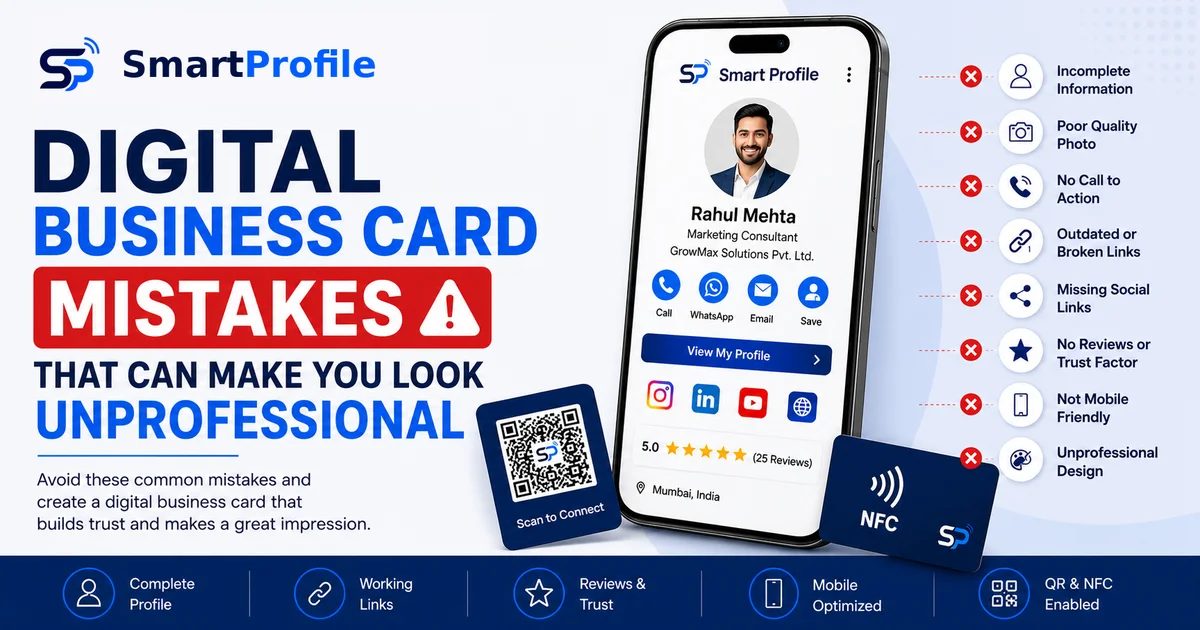
A digital business card only works if the person you send it to actually trusts what they're looking at. And that's where most people go wrong — not with the idea of a digital business card, but with how they've set theirs up.
If your profile looks rushed, incomplete, or hard to navigate, it can undo the good impression you were trying to make in the first place. Below are the most common digital business card mistakes we see, why they matter, and what a properly built profile should include instead.
Common Digital Business Card Mistakes
1. Incomplete Information
A digital business card with a missing phone number, no company name, or a blank job title looks unfinished the moment someone opens it. It signals that the profile was set up in a hurry and never revisited. At minimum, your card should clearly show your name, designation, company, phone number, email, and a way to reach you on WhatsApp.
2. Poor Quality Photo
A blurry, poorly lit, or overly casual photo undercuts everything else on the card. Since the photo is usually the first thing someone sees, a low-quality image makes the whole profile feel less credible, even if the rest of it is well built. A simple, well-lit headshot works far better than no photo at all, or a photo cropped from a group picture.
3. No Call to Action
Some digital business cards just sit there — contact details listed, nothing more. Without a clear next step like "Save Contact," "View My Profile," or "Message on WhatsApp," the person you shared it with has to figure out what to do next on their own. Most people won't bother. A visible button that does one clear thing removes that friction entirely.
4. Outdated or Broken Links
A website link that leads nowhere, a WhatsApp number that's no longer active, or a social media handle you stopped using all chip away at trust fast. These are easy to miss because you're not the one clicking them day to day. It's worth testing every link on your card every few months, especially after you change numbers or update your business details.
5. Missing Social Links
If someone wants to check your work before reaching out, LinkedIn, Instagram, or your portfolio are often the first places they look. Leaving these off the card means you're relying entirely on the contact details to build trust, when a couple of extra links could do that work for you.
6. No Reviews or Trust Factor
A phone number and a title tell someone who you are. Reviews and testimonials tell them whether you're good at what you do. Cards that skip this entirely miss out on one of the easiest ways to build credibility, especially for service-based businesses where trust decides whether someone reaches out at all.
7. Not Mobile Friendly
Since digital business cards are commonly opened on smartphones, often within seconds of receiving it, mobile display matters a lot. If the layout doesn't adjust properly, text overflows, or buttons are too small to tap, that first impression is gone before they've even read your name. Since most modern platforms handle this automatically, it's worth actually opening your own card on a phone to check.
8. Unprofessional Design
Mismatched colours, too many fonts, or a cluttered layout can make even a well-built profile look amateur. Design doesn't need to be elaborate, but it should be consistent, easy to read, and reflect how you'd want your business to come across in person.
What Should a Professional Digital Business Card Include?
Once you know what to avoid, it helps to have a clear picture of what a complete card actually looks like. A well-built profile generally covers six areas:
Identity — your name, photo, designation, company, and logo, so anyone opening the card instantly knows who they're looking at.
Contact — phone number, email, WhatsApp, and a one-tap save-contact option, so getting in touch takes no extra effort.
Business — your website, location, and a short description of your products or services, giving context beyond just your name and title.
Social — links to Instagram, Facebook, LinkedIn, or YouTube, wherever you're active, so people can see more of your work if they choose to.
Trust — Google reviews or testimonials, which do more to convince a stranger than any amount of self-description.
Sharing — a QR code and NFC tap option, so the card can be shared instantly in person, not just as a link.
Put together, these six areas turn a digital business card into something closer to a mini business profile than a simple contact list. See our detailed guide on what to put on a digital business card for the full list of 15 elements.
Quick Fixes to Try Today
Most of the fixes here are quick once you know what to look for (see our full guide on making your digital business card more professional for more):
Fill in every field, even the ones that feel optional — an empty section stands out more than you'd think.
Replace any casual or low-resolution photo with a clear, well-lit headshot.
Add a save-contact button so people don't have to type your details manually.
Check every link on your card once every few months.
Add at least two or three social links relevant to your work.
Include a few reviews or a short testimonial if you have one.
Preview your card on your own phone before sharing it with anyone else.
None of these take long individually, but together they're usually the difference between a card that gets a second look and one that gets forgotten.
NFC vs QR Code: Which Should You Use?
Both are ways to share your digital business card instantly, and most well-built profiles support both rather than choosing one over the other. A QR code can be scanned by most modern smartphones using their camera or a QR-scanning feature, no extra hardware needed. An NFC card skips the scanning step entirely — just a tap on the back of a phone opens your profile. If you're deciding between the two, we've covered the differences in more detail in our NFC business card vs QR code guide.