What Should You Put on a Digital Business Card? 15 Essential Elements
Introduction
A digital business card isn't just a phone number and an email address online. A well-built one works more like a mini business profile — contact details, social presence, products or services, location, reviews, and a clear next step for the visitor, all in one shareable page.
The problem is most people stop at the basics: name and number, done. That leaves out the elements that actually turn a viewer into an enquiry. This guide breaks down all 15 elements a complete digital business card should have, what to leave out, and how to organize it so it actually works.
What Is a Digital Business Card?
If you're new to the concept — a digital business card is a shareable online profile that replaces (or supplements) a paper card. It opens with a tap of an NFC card, a QR code scan, or a direct link, and shows on the visitor's phone instantly, without needing an app. Because it's a live page rather than a printed card, you can update it anytime and pack in far more than a name and a number.
The 15 Essential Elements
1. Full Name
Your professional identity should be immediately clear — the name customers will actually search for or refer you by.
2. Job Title or Role
Tells the visitor what you do in one glance — "Founder," "Sales Manager," "Interior Designer" — before they read anything else.
3. Business or Company Name
Whether you're an individual professional or a business owner, your brand name needs to be visible, not buried.
4. Professional Photo
A real, clear photo builds trust and personal connection, especially for freelancers, consultants, and sales professionals.
5. Company Logo
For established businesses, the logo builds brand recognition and signals credibility at a glance.
6. Phone Number
A tap-to-call button removes the extra step of manually copying or entering a phone number.
7. WhatsApp Number
For many small businesses in India, a direct WhatsApp button can make it easier for customers to start a conversation.
8. Email Address
Useful for formal enquiries, quotations, or customers who want something in writing.
9. Website
If you run a separate website, link to it here — the digital card can send qualified traffic straight to it.
10. Social Media Profiles
Add Instagram, Facebook, LinkedIn, or YouTube — but only the ones you're actually active on. A dead or inactive link does more harm than good.
11. Products or Services
This is often the biggest differentiator. Instead of a vague line like "we sell premium products," show the actual products or services with names, photos, or short descriptions.
12. Business Location
Address plus a map or directions link — critical for shops, salons, restaurants, clinics, and any business that depends on footfall.
13. Customer Reviews
Reviews or testimonials turn a digital card from a brochure into a trust-building tool. Even two or three genuine reviews add credibility no amount of self-description can.
14. Call-to-Action
This is the element most cards miss entirely. "Call Now," "WhatsApp Us," "Get a Quote," "Book an Appointment," "Visit Store" — the visitor should never have to guess what to do next.
15. QR Code and NFC Sharing
Finally, the sharing mechanism itself. A QR code lets anyone scan and land on your profile instantly; an NFC card does the same with a single tap. These aren't part of the profile's content — they're how people reach it — but a card without an easy sharing method won't get used.
What Should You NOT Put on a Digital Business Card?
More isn't always better. A few things to leave out:
Too much text or long paragraphs no one will read.
Social accounts you don't actually post on.
Personal information unrelated to the business.
Outdated phone numbers or addresses.
Too many buttons competing for attention.
Low-quality or blurry photos.
Broken or outdated links.
Products or services you no longer offer.
A card with 10 well-chosen elements beats one with 20 cluttered ones. See our full guide on common digital business card mistakes for more on what to avoid.
How to Organize the Information
Order matters as much as content. A layout that generally works well:
Photo/logo + name → role or business name → short about section → call/WhatsApp buttons → products or services → social media → location → reviews → website or more information
This mirrors how a visitor actually thinks: who is this, what do they do, how do I reach them, what do they offer, can I trust them, where are they.
Example: A Complete Digital Business Card
To make this concrete, here's what a well-built card might look like for an interior designer:
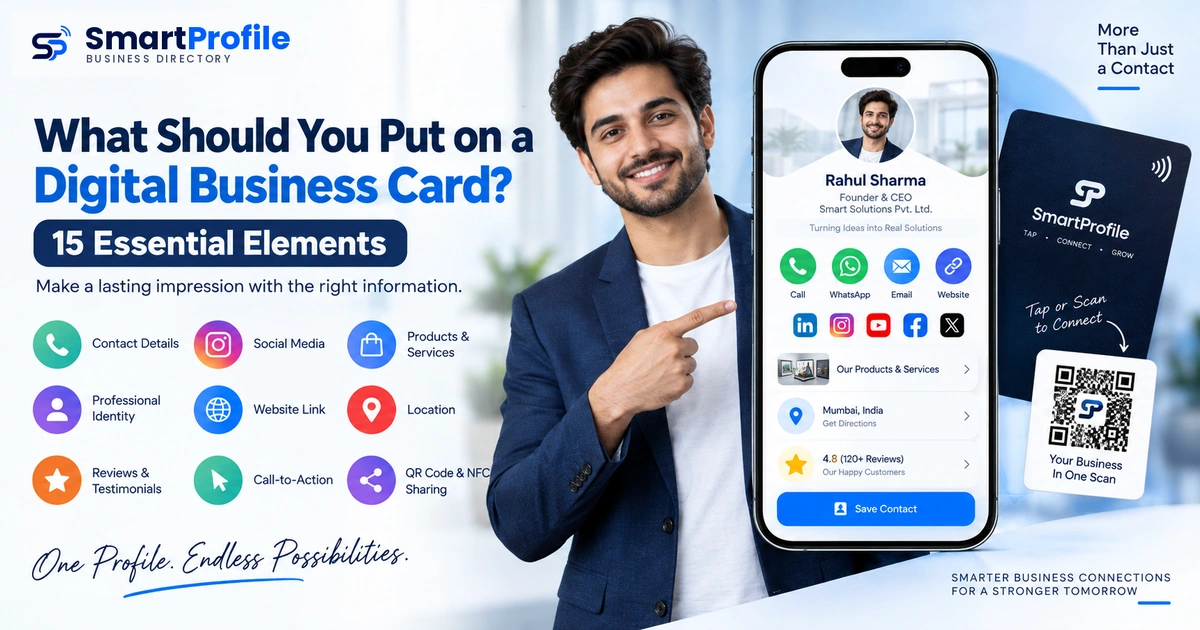
Rahul Sharma — Founder, ABC Interiors Call · WhatsApp · Email *Short about section* Services: Interior Design, Modular Kitchen, Office Interiors Products: Photo gallery of recent work Instagram | Facebook | LinkedIn 📍 Mumbai ⭐ Customer reviews Visit Website · Share via QR/NFC
Notice how every element from the list above shows up here in a natural order, without feeling crowded.
Digital Business Cards for Different Types of Users
What matters most shifts depending on who's using the card:
[Small business owner](/blog/digital-business-card-for-small-business) — products, WhatsApp, location, and reviews carry the most weight.
Freelancer — portfolio-style examples, LinkedIn, email, and a clear services list matter most.
Sales professional — company branding, products, WhatsApp, and an appointment CTA drive results.
Consultant — services, testimonials, and a booking link are the priority.
Retail store — products, location, reviews, and WhatsApp lead the way.
The 15 elements stay the same; which ones you emphasize changes with your business.
Bringing It All Together
Building a card with all 15 elements sounds like a lot until you realize a modern digital business card can hold all of it — contact details, social links, products, location, reviews, and a call-to-action — in one shareable, updatable profile. That's the gap SmartProfile digital business cards are built to close: instead of juggling a paper card, a separate Instagram bio link, and a Google listing, everything lives on one page you can share via link, QR code, or an NFC card.
Final Checklist
Before publishing your digital business card — see our step-by-step creation guide if you haven't set one up yet — check that it has:
☐ Full name
☐ Job title or role
☐ Business name
☐ Professional photo
☐ Logo
☐ Phone number
☐ Website
☐ Relevant social media
☐ Products or services
☐ Location
☐ Reviews
☐ A clear call-to-action
☐ QR code / NFC sharing set up